
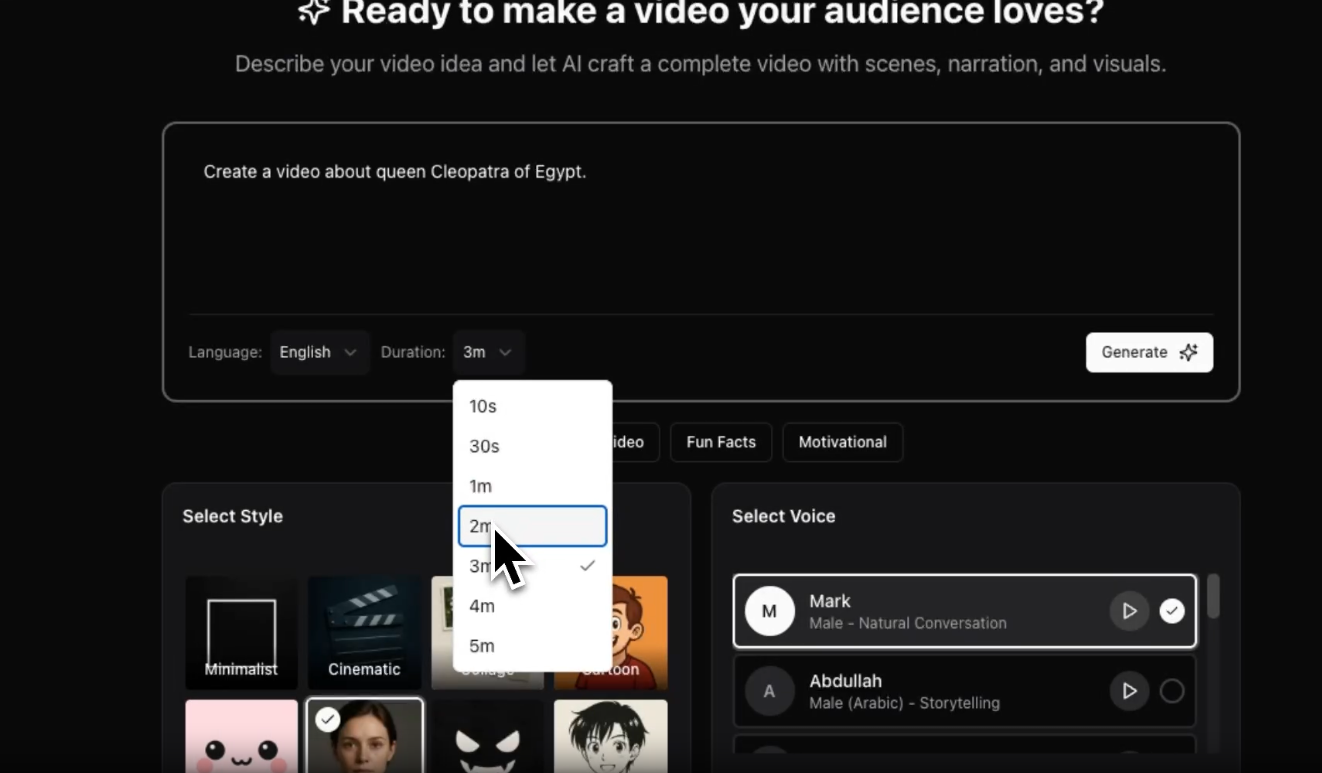
Introducing AI Video Agent: Turn Ideas into Professional Videos in Minutes
Meet your personal AI video creator. Just provide an idea, and our AI agent handles everything from script writing to video editing. No experience needed.
We're thrilled to announce the launch of AI Video Agent — your personal AI video creator that transforms simple ideas into polished, professional videos without any editing experience required.
What is AI Video Agent?
AI Video Agent is the newest addition to Clip-Short's suite of AI-powered video tools. While our existing features help you repurpose long-form content, AI Video Agent does something entirely different: it creates videos from scratch.
Simply describe what you want to create — a product explainer, educational content, social media post, or anything else — and our AI agent handles the rest:
- ✍️ Writes a compelling script
- 🎨 Generates stunning visuals
- 🎙️ Creates natural-sounding voiceovers
- 🎬 Edits everything into a polished video
- 🎵 Adds background music and transitions
From Idea to Video: How It Works
Step 1: Describe Your Idea
No need for detailed scripts or storyboards. Just tell our AI what you want:
- "Create a 60-second explainer video about sustainable fashion"
- "Make an engaging tutorial on making sourdough bread"
- "Produce a product demo for my new productivity app"
The more specific you are, the better the results, but even simple prompts work great.
Step 2: AI Generates Your Video
Our AI agent springs into action:
- Script Writing: Creates a narrative arc with engaging storytelling
- Visual Generation: Makes AI pictures (and finds stock footage) for each scene of your script
- Voiceover Creation: Selects an appropriate AI voice and generates natural narration
- Video Assembly: Combines everything with smooth transitions, text overlays, and background music
All of this happens automatically in just a few minutes.
Step 3: Customize & Enhance (Optional)
While our AI does excellent work out of the box, you have powerful customization options:
Re-generate Images Don't like a particular scene? Regenerate its pictures (each plan includes a number of regenerations per video).
Edit Images by Describing the Change (paid plans) Adjust any picture in plain words:
- "Make the background more vibrant"
- "Add a person in the foreground"
- "Change the lighting to golden hour"
Animate Slides with I2V (Image-to-Video) Turn a still picture into a short moving shot (paid plans).
Step 4: Export & Share
Download your video in the shape your platform uses: 9:16 for TikTok, Reels and Shorts, 1:1, 4:5 or 16:9.
Real-World Use Cases
Content Creators
Turn blog posts or ideas into video content without hours of filming and editing. Perfect for:
- Educational content
- Product reviews
- How-to tutorials
- Storytime videos
Businesses & Marketers
Create professional marketing content at scale:
- Product explainers
- Service overviews
- Customer testimonials
- Brand storytelling videos
Educators & Trainers
Produce engaging educational videos:
- Course content
- Tutorial videos
- Concept explanations
- Quick learning modules
Social Media Managers
Generate consistent video content for multiple platforms:
- Daily tips and tricks
- Behind-the-scenes content
- Announcement videos
- Promotional clips
Advanced Features That Set Us Apart
AI-Powered Image Generation
Our AI creates custom images specifically designed for your content. No more searching through stock photo libraries or dealing with licensing issues. Every image is:
- Original: Generated specifically for your video
- On-brand: Matches your script and tone
- High-quality: Professional-grade visuals
- Editable: Regenerate or refine any image
Natural AI Voiceovers
Choose from a variety of AI-generated voices that sound remarkably human:
- Several voices to choose from, each with its own character
- Natural intonation and pacing
- The same voice across your whole video
- On paid plans, your own voice
Smart Video Editing
Our AI doesn't just slap images together — it creates a cohesive video with:
- Captions: every word of the narration, timed to the voice
- Background music: instrumental tracks picked by the video's mood, under the narration
- Timing: Each scene's pictures last as long as its narration
Edit a Picture by Describing the Change
Not happy with a picture? Regenerate it, or, on paid plans, describe the change you want and the image model (Google's Gemini) edits it:
- Adjust colors, lighting or composition
- Add or remove elements
- Change the style or mood
I2V Animation
Take your videos to the next level by animating static images. Our I2V (Image-to-Video) feature adds:
- Motion in a still scene
- Camera movement
- A livelier video overall
Animations are counted per video, and the free plan has none; the pricing page lists how many each plan includes.
Pricing & Plans
Clip-Short starts free: the free plan includes 1 hour of video processing and 1 AI Agent video a month. Pro is US$15 a month (or US$100 a year) for each bundle of 5 hours of processing and 10 AI Agent videos, with no watermark and 3 reprompts per video; add bundles when you need more. Paid plans come with a 14-day refund policy. The pricing page lists everything each plan includes.
Best Practices for Great Results
1. Be Specific in Your Prompts
Instead of: "Make a video about fitness"
Try: "Create a 60-second motivational video about starting a morning workout routine, targeting beginners who want to build healthy habits"
2. Iterate on Images
Don't settle for your first result. Use the regenerate feature to explore different visual styles until you find the perfect match for your brand.
3. Customize Voiceovers
Try different AI voices to find the one that best represents your brand personality. The right voice can significantly impact engagement.
4. Edit an Image Instead of Starting Over
If an image is nearly right, describe the change you want and edit it, rather than generating a new one from scratch.
5. Test Different Lengths
Shorter videos (30-60 seconds) tend to perform best on social media, but longer formats (2-3 minutes) work great for educational content.
What Makes Our AI Agent Different?
From an Idea to a Video
You don't write the script, find pictures or arrange slides: the AI Agent does all of it from your idea, and every scene stays editable.
Editing Capabilities
Regenerate or edit any picture, rewrite any line of narration, change the voice, and the video updates.
Animation Features
Our I2V integration lets you add motion to any scene, creating more dynamic and engaging videos.
Integrated Platform
AI Video Agent works seamlessly with our other features (AI clipping, auto-captions, reframing), so you can create AND repurpose content all in one place.
Getting Started
Ready to create your first AI-powered video?
- Sign up for a free account — No credit card required
- Navigate to AI Agent — Find it in your dashboard
- Describe your idea — Tell us what you want to create
- Watch the magic happen — Our AI builds your video in minutes
- Customize & export — Make any tweaks and download
Start creating with AI Video Agent →
What's New Since Launch
- Your own voice: on paid plans, narrate videos of up to 3 minutes in your own voice, made from one recording of you reading a sentence
- Series: a new episode on your topic drafted on a schedule, each waiting for you to review and post
- Recurring characters: draw a character once and keep the same face across videos
- Formats: countdowns, quizzes, chat stories and POV videos, besides stories
- Other languages: make a finished video again in another language, over the same pictures
- Music: a background track under the narration, picked by mood
Frequently Asked Questions
Q: How long does it take to generate a video?
A: A few minutes, depending on the video's length. You can leave the page while it works.
Q: Can I use these videos commercially?
A: You can post them on your own channels, monetized ones included. YouTube's and TikTok's own rules on original content and AI disclosure still apply: our monetization guide has them.
Q: What video lengths are supported?
A: From 1 to 10 minutes. The free plan makes 1-minute videos.
Q: Can I edit the script after generation?
A: Yes, you can regenerate with a modified prompt or use our image regeneration and editing features to adjust individual scenes.
Q: What languages are supported?
A: The narration can be in 11 languages, among them English, Spanish, Portuguese, French, German, Italian and Arabic.
Q: How many times can I regenerate images?
A: Each plan includes a set number of image regenerations per video; the pricing page lists them.
Q: Do you offer refunds?
A: Yes! We offer a 14-day money-back guarantee on all paid plans.
Join the Future of Video Creation
AI Video Agent represents a fundamental shift in how videos are made. No longer do you need expensive equipment, editing skills, or hours of time. Just an idea and a few minutes.
Whether you're a solo creator looking to scale your content, a business wanting to enhance your marketing, or an educator making learning more engaging, AI Video Agent is built for you.
Start free today and create your first AI-powered video in minutes.
Get started free → | Watch demo video | View pricing →
Have questions about AI Video Agent? Contact our support team — we're here to help!
Try it on your own video
Start on the free plan, and upgrade only when you need more.